For my logo I am trying to make a logo that would work for my high school football team the Pateros High School Billygoats. I started by making the background purple. Yes, purple because was my schools primary color along with gold. I then use the typing tool to type Pateros Football and Go Billygoats. I then made the color fill of the Pateros Football gold and the stroke purple. For the go Billygoats I turned the color fill into white and the stroke is gold. I then added a Billy goat head in which I cropped down a little and will try to cut out so the head fits while into the background. The text style is Algerian, and the font sizes are different so I could fit the words on the page. I will probably change the template that I used so that I can fit all the words onto one line instead of two. I also changed the stroke fill on each so the two fills were different from one another. I then added a second Billygoat head and reflected the other head so that both were facing each other as if they were going to be put onto a poster. For me I struggled with illustrator because it was the first time ever that I have used it. It was a different kind of experience and I know that there is a lot of work to be done before it is finished. As for the story I am trying to tell with this poster is that my school sometimes does not get support like this and that I feel like their football team deserves attention. They work hard each week and play tough no matter who they play. I enjoyed working on this and I will continue to work hard to make it even better using more tools from within illustrator to make this an absolutely perfect representation of me and my story.
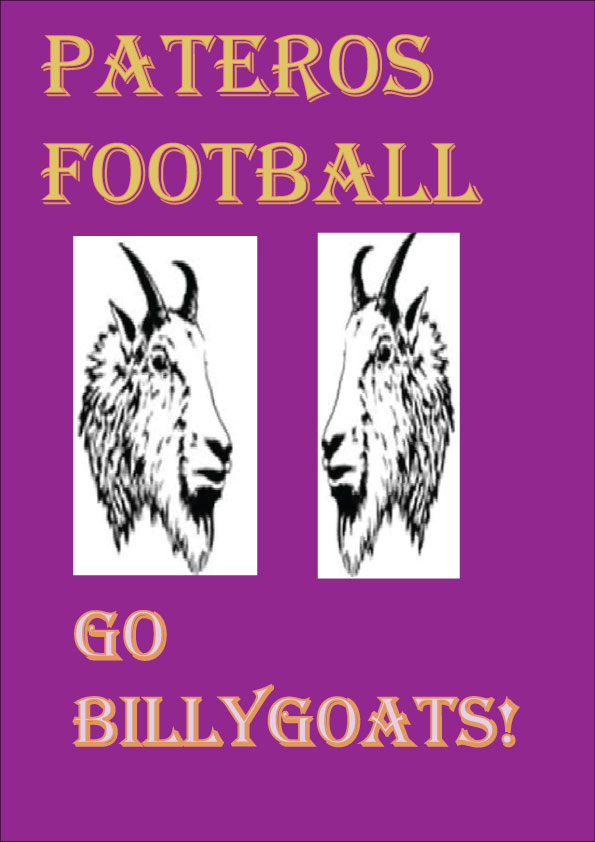


Zane, I like how passionate you are about your course topic. I think keeping those original colors in your design creates a nice contrast for your logo. You mentioned struggling with Illustrator. I would suggest looking back through the tutorials and looking at more videos on YouTube to answer your questions so you can have the full experience and not feel lost using this program. It looks like you inserted an image of the Billy goat, for your next draft you can make this a scalable vector by drawing over it with the pen tool. This way it will never become pixelated at any size. Also, it will be drawn from your own hand and not taken from somewhere else. As you had mentioned in your post, I think it would also be a good idea to make the text be centered and in single lines, you could even use the arcing tool, gone over in the tutorials, to frame the Billy goats.
LikeLike
Great job so far on the draft. Using your highschool football team is a creative and unique way to demonstrate the topic that you are passionate about. One thing that I liked about your logo was the text that you inserted. I thought that the font was aesthetically pleasing to the eye and it wasn’t too flashy. But through working to the final draft, there are some edits that can be made to make this logo better. One improvement that can be made is editing the images of the goats. You could crop and adjust the contrast and texture of the picture to make it more even and visually clear. I would also recommend putting the goats in a circle frame because having a square picture lacks effort. Another thing that you could do to improve this logo is add more elements. Although the purple, text, and goats look awesome, there is a lot more tools that Illustrator has to offer such as adding multiple layers of color, creating an abstract background, and shapes to make it stand out. Other than that good work so far and I look forward to seeing your final product.
LikeLike
Hey Zane, I really like what you did with your draft logo! The colors the you picked really bounce off one another and adds a clean look to your post. By bringing your high school football team into one of these projects is really cool that it means so much to you. One thing that I would recommend changing will be the proportion with the two pictures of the goats, the one on the left seems to be a little bit bigger than the one on the right. I would also crop out the white background behind the 2 pictures. It would make it look a lot more organized and clearer for your final draft. There are some tools that I have to learn more about too, but If I were you, I would just practice with some of the other textures, borders and colors to make your logo stand out more than it does already. I look forward to seeing your final draft. Good luck!
LikeLike
Hey Zane, I like your draft a lot! I think the colors really reflect well off of eachother and almost make things pop that much more. I like how you incorporated your high school logo, it shows that it is very personal to you. Something I would suggest is maybe changing the picture of the goats around a little. They seem a little pixelated. You could maybe change the size to a bit smaller and create some contrast or play with the saturation a bit to see what it could do for the piece itself. Maybe you could also take out the white background of the goats to make it stick out even more. There is also a tool, the pen tool, that you can go around your goats with to help take away that blurriness that the goats have. All in all I think this is a great start to your final draft.
LikeLike